Customer memory and privacy
Agent Red's Persistent Customer Memory is a four-layer system that enables the AI to build context about each customer over time. Every conversation adds to the customer's profile, and future conversations benefit from that accumulated context.
This is Agent Red's primary differentiator — no competitor has confirmed implementing per-customer vector search over historical conversation transcripts.
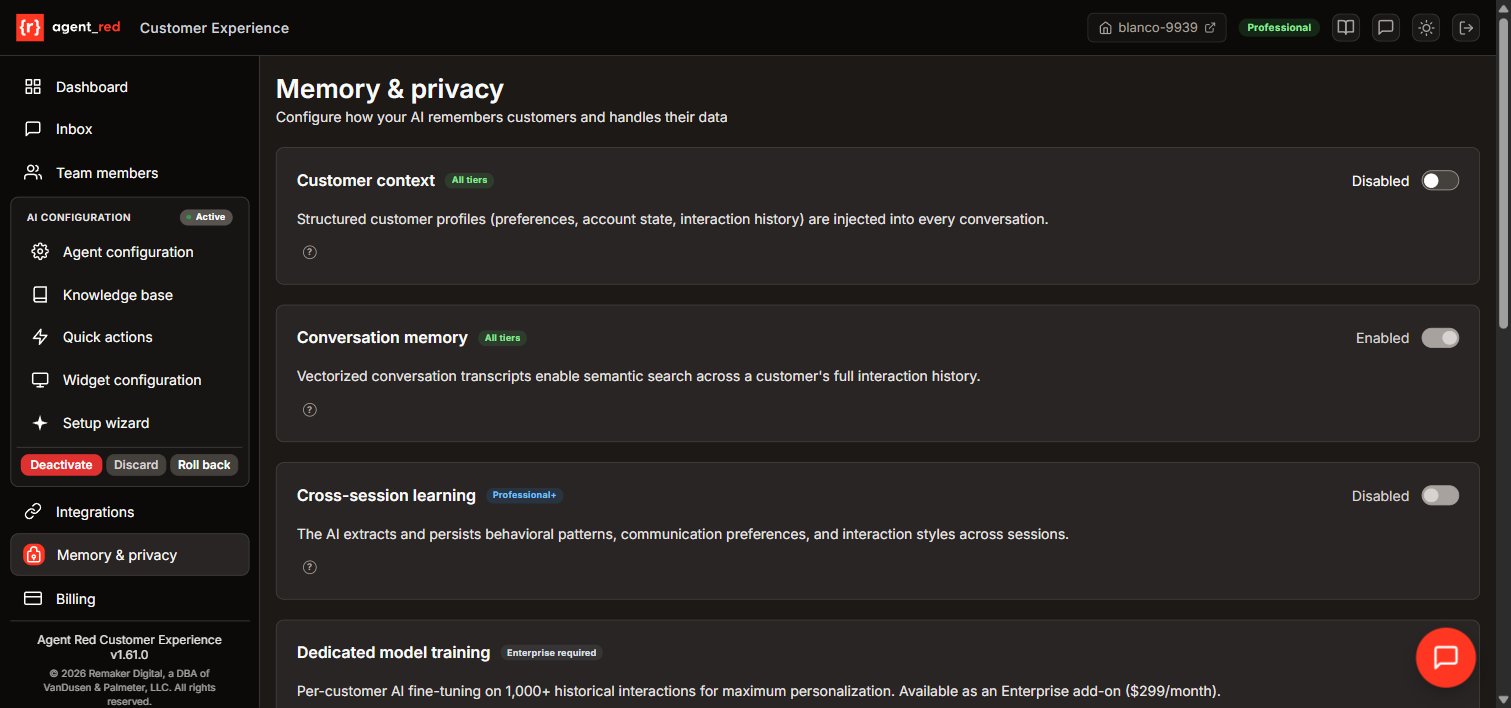
How the layers work
Layer 1: Customer profiles (all tiers)
    ↓ Structured data: name, purchase history, preferences
Layer 2: Conversation memory (all tiers)
    ↓ Vectorized transcripts: semantic search across past conversations
Layer 3: Cross-session learning (Professional+)
    ↓ Extracted patterns: communication style, topic preferences
Layer 4: Dedicated model training (Enterprise)
    ↓ Per-customer fine-tuned model on 1,000+ interactions
Each layer builds on the previous one. More layers mean more personalized responses.
Memory enabled
| Field | memory_enabled |
| Type | Toggle (on/off) |
| Default | On |
| Affects | Customer memory (Layers 1–2), response generator |
Controls whether the AI stores and uses customer profiles and conversation history.
When enabled:
- Layer 1: The customer's profile (name, purchase history, preferences, previous questions) is loaded at the start of each conversation and injected into the response generator's system prompt (~250 tokens). Profile data is collected from multiple sources including Shopify customer data, asserted identity (see below), and conversation history.
- Layer 2: Past conversation transcripts are vectorized and searchable. When a customer asks a follow-up question or references a previous interaction, the AI can find relevant context from earlier conversations (~300 tokens).
When disabled:
- Every conversation starts from scratch. The AI treats every customer as a first-time visitor.
- No customer data is stored between conversations.
- Existing stored data is not deleted when you disable memory — it is simply not loaded. To delete stored data, use the GDPR tools in the admin console.
When to disable:
- You are required by regulation to treat every interaction independently (some financial or medical contexts).
- You want to test the AI's performance without memory influence.
Customer identification
Persistent Customer Memory requires knowing who the customer is. Without identification, the AI cannot recall past interactions, preferences, or purchase history.
Agent Red uses a layered identification system — customers are identified through the strongest available method:
Identity hierarchy (highest to lowest):
| Level | Method | Verification | How it works |
|---|---|---|---|
| 1 | Shopify customer | HMAC-verified | Logged-in Shopify customers are identified automatically via cryptographic verification. No form, no code — identity is confirmed before the conversation starts. |
| 2 | OTP email verification | Email-verified | Customers who provide their email in the pre-chat form receive a 6-digit one-time code. Entering the code confirms they own the email address. |
| 3 | Pre-chat form | Self-asserted | The pre-chat form collects name and email before the conversation starts. The email is stored as unverified until confirmed via OTP. |
| 4 | In-conversation assertion | Unverified | If a customer mentions their name or email during a conversation, Agent Red extracts it and stores it on the customer profile with an unverified status. |
| 5 | Anonymous session | None | Customers who skip the pre-chat form ("Continue as guest") receive limited service. The AI warns about reduced capabilities and prompts for email when needed. |
Pre-chat form (enabled by default): The pre-chat form is the primary identification mechanism. It is enabled by default for all new tenants. Customers who skip the form can still use the chat, but without access to order lookups, account management, loyalty programs, or personalized recommendations. See Widget behavior — Pre-chat form for configuration details.
Asserted identity extraction: When a customer mentions their name or email during a conversation (e.g., "My name is Sarah" or "my email is sarah@example.com"), Agent Red automatically extracts this information and stores it on the customer's profile with an unverified status. The customer's display name in the Inbox updates from a session ID to the asserted name. Unverified identities are shown with a badge. This feature requires no configuration — it activates automatically when Customer Memory is enabled.
Pattern learning
| Field | pattern_learning_enabled |
| Type | Toggle (on/off) |
| Default | Off |
| Tier | Professional and Enterprise |
| Affects | Customer memory (Layer 3), response generator |
Enables cross-session learning. After each conversation, the AI analyzes the transcript and extracts patterns about the customer: communication preferences (formal vs. casual, detailed vs. concise), topic interests, and buying behavior. These patterns are stored and used to personalize future conversations.
How it works:
- After a conversation ends, a background job analyzes the transcript using GPT-4o-mini.
- Extracted patterns are stored with a confidence score (0.0–1.0).
- Patterns decay over time (0.05/month) — old patterns gradually lose influence so the AI adapts to changing customer preferences.
- High-confidence patterns are injected into the response generator's prompt (~100 tokens).
When to enable:
- You have repeat customers who interact with your store multiple times.
- You want the AI to adapt its communication style to each customer over time.
- Professional or Enterprise tier.
When to leave off:
- Most of your customers are one-time buyers.
- You prefer a consistent experience for all customers regardless of history.
Dedicated model training
| Field | fine_tuning_enabled |
| Type | Toggle (on/off) |
| Default | Off |
| Tier | Enterprise (add-on: $299/month) |
| Affects | Customer memory (Layer 4), response generator |
Enables per-customer AI fine-tuning. After a customer accumulates 1,000+ historical interactions, Agent Red can create a fine-tuned model specifically for that customer, delivering maximum personalization.
How it works:
- When a customer reaches 1,000 interactions, the system evaluates whether fine-tuning would improve response quality.
- A fine-tuning job is submitted to Azure OpenAI using the customer's historical data.
- The fine-tuned model is used for that specific customer's future conversations.
- Models are periodically re-trained as new interactions accumulate.
Requirements:
- Enterprise tier subscription.
- Customer must have 1,000+ historical interactions.
- Customer context (Layer 1) and Conversation memory (Layer 2) must be enabled.
When to enable:
- You have high-value customers with extensive interaction histories.
- Maximum personalization justifies the per-customer training cost.
PII scrubbing
| Field | pii_scrubbing |
| Type | Toggle (on/off) |
| Default | Off |
| Affects | Stored conversation transcripts |
When enabled, Agent Red automatically scrubs personally identifiable information (PII) from conversation transcripts before storing them. This includes:
- Email addresses — Replaced with
[REDACTED] - Phone numbers — Replaced with
[REDACTED]
PII scrubbing operates at the storage layer only. Live responses delivered to the customer during the conversation are not affected. This means the customer experience is unchanged, but the stored transcript is cleaned for privacy compliance.
Enable PII scrubbing from the Memory & Privacy page in the admin console.
Data retention
| Field | data_retention_days |
| Type | Number (30–unlimited) |
| Default | Starter: 90 days, Professional: 365 days, Enterprise: unlimited |
| Affects | All memory layers |
How long conversation data and customer memory are retained. After this period, data is moved to archival storage and eventually deleted according to the three-tier retention policy:
- Hot storage (Cosmos DB): Active data within retention period. Immediately searchable.
- Warm archive (Azure Blob Cool): Data older than retention period but less than 7 years. Available on request within 24 hours.
- Cold archive (Azure Blob Archive): Data older than 7 years. Available on request within 48 hours.
How to choose:
- 30–90 days: For stores where past interactions have limited ongoing value.
- 365 days: For stores with seasonal customers who return annually.
- Unlimited: For stores that want full customer history preserved indefinitely.
Consent collection
| Field | consent_collection_enabled |
| Type | Toggle (on/off) |
| Default | On |
| Affects | All memory layers |
When enabled, the widget asks customers to consent to memory features before storing their data. Customers who decline consent still get AI responses, but no data is stored between conversations (effectively disabling Layers 1–3 for that customer).
How consent works:
- Consent status is per-customer:
granted,denied, ornot_asked. - If consent is denied, any previously stored data for that customer is automatically deleted (GDPR Article 17 compliance).
- Layers 2–3 require explicit consent. Layer 1 basic profile data (name from the conversation) may be retained for the duration of the conversation only.
When to disable:
- Your jurisdiction does not require explicit consent for storing conversation data (check with your legal team).
- You want a frictionless experience and are comfortable with implied consent through your privacy policy.
© 2026 Remaker Digital, a DBA of VanDusen & Palmeter, LLC. All rights reserved.
Was this page helpful?